

Filter applications by a certain status or tag
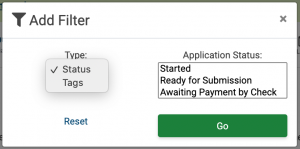
Click the green Add Filter link to open the filter pop-up. Choose to filter your applications by either application status or by your custom tags.
Select your filter type, and then select the application status(es) or tag(s) you want to view.
Click Go, and you will only see applications within the status(es) selected or tagged with the selected custom tag.
To remove the filter, click on the Filter link again and then click the Reset link.
Sorting Applications
To sort applications, you can either use the Sort By drop down or you can click on the table headers. If using the Sort By drop-down, select the way you would like to sort the page from the list.
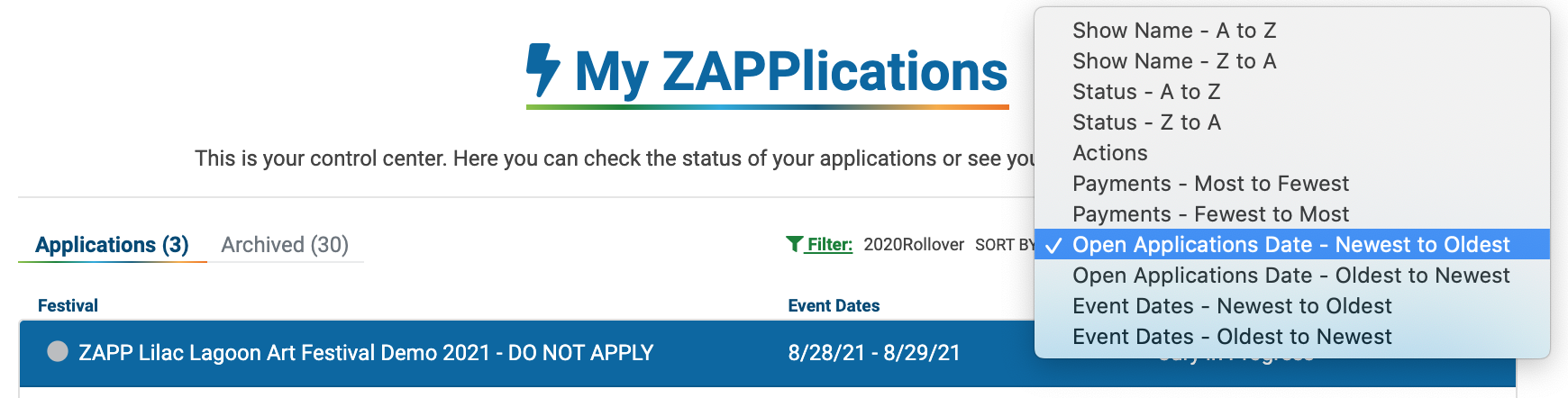
Click the arrow to the left of each sorting option to see more details.
Show Name
Sorts applications by the name of the show alphabetically from A to Z or from Z to A.
Status
Sorts applications by application status alphabetically from A to Z or from Z to A.
Actions
Sorts applications by action title alphabetically from A to Z
Payments
Sorts applications by number of payments made, either most to fewest or fewest to most.
Open Applications Date
Sorts applications by the date the applications opened, from most recent to oldest or from oldest to most recent.
Event Dates
Sorts applications by the first date of the event, from soonest to latest or latest to oldest.
